Rollout Groups
Rollout Groups let you introduce members of one group into another in controlled stages, rather than moving everyone at once. This is useful when rolling out new access policies, migrating between security groups, or gradually transitioning users to a new configuration.
Rollout Groups is currently a beta feature.
When to Use Rollout Groups
- Migrating users from a legacy security group to a new one without disrupting access all at once
- Gradually rolling out a new policy or application license to batches of users
- Testing changes with a small group before extending to the entire organization
- Any scenario where a staged, controlled approach to group membership changes is preferred
Setting Up a Rollout
Name and Description
Give your rollout plan a clear name so it's easy to identify in the Saved Plans list. The description field is optional but useful for explaining the purpose of the migration.
Source and Target Groups
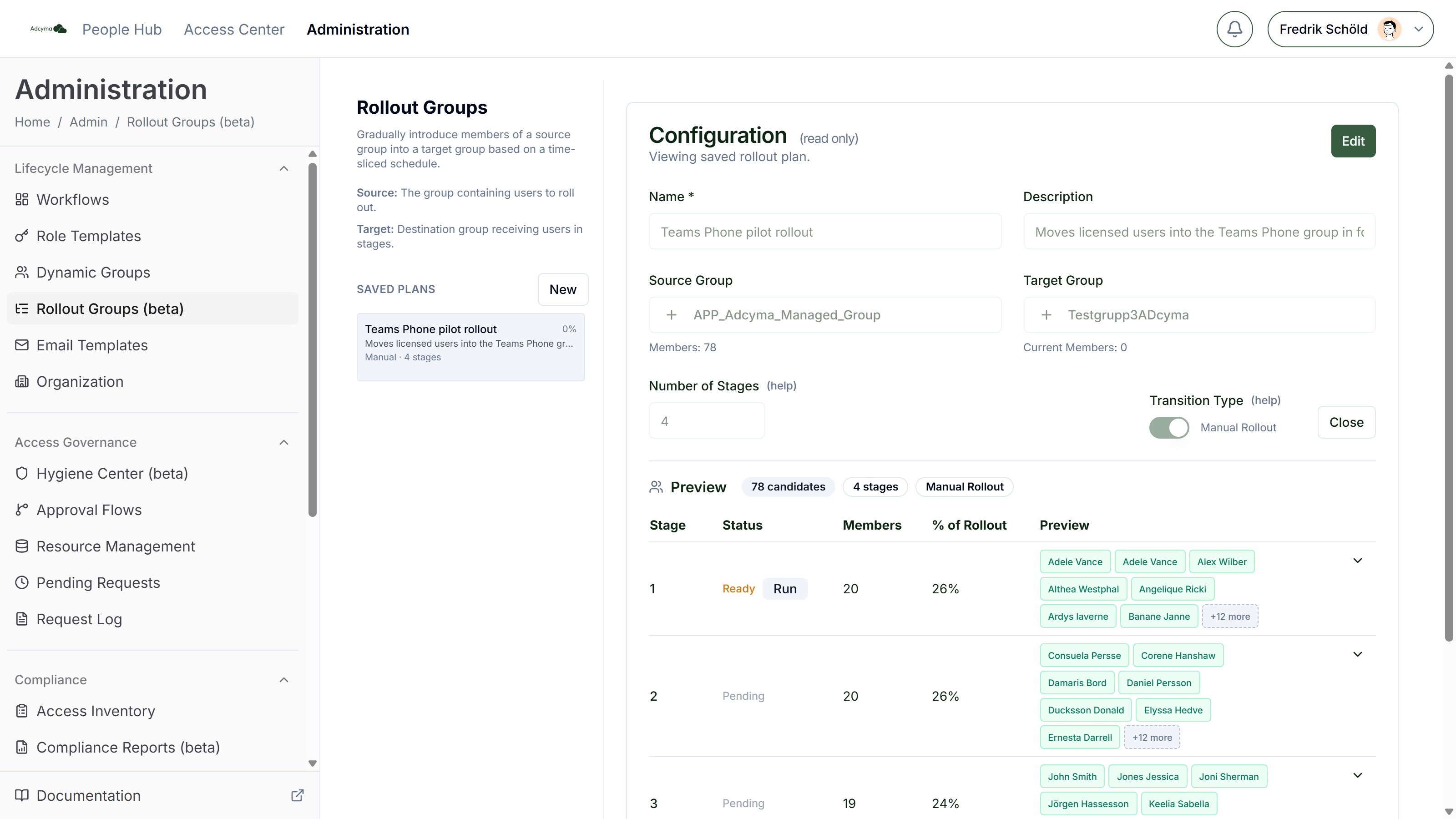
Select the Source Group (the group containing the users to roll out) and the Target Group (the destination group receiving users in stages). Users who are in the source group but not yet in the target group are the rollout candidates. If you need a new target, you can create a new Entra Security Group directly from the picker.
Schedule and Stages
Start At The date and time the rollout begins.
Rollout Duration The full time span of the migration, in hours or days.
Number of Stages How many batches the candidates are divided into. Adcyma splits the users evenly across the stages, and the waiting period between stages is calculated from the total duration.
Transition Type Choose how stages execute:
- Manual Rollout - You run each stage by hand with a per-stage Run button when you're ready. This gives you full control and is ideal for high-stakes migrations.
- Scheduled Rollout - Stages execute automatically based on the configured schedule. Use this for lower-risk migrations where you're confident in the configuration. Scheduled rollouts can be paused and resumed; manual rollouts don't need pausing since nothing happens until you run a stage.
Preview
Before saving, the Preview table shows each stage with its start time or status, the members it will move, and its share of the rollout. You can expand a stage to see exactly which users it contains. Badges warn you if some stages would be empty.
Monitoring Progress
Saved plans appear in the sidebar with a progress bar, the transition mode, stage count, and time window. Click into a plan to see which stage is active, how many users have been moved, and what remains. If something goes wrong with a scheduled rollout, pause it before the next stage executes.
Best Practices
- Start with a small number of stages to validate that the migration works as expected before going broad.
- Allow enough time between stages to gather feedback from users and verify that access is working correctly.
- Use manual mode for the first rollout of a new type, then switch to scheduled mode once you're confident in the process.
- Communicate the rollout schedule to affected users so they know when to expect changes.
- Keep the source group intact until the rollout is fully complete and verified. This makes it easier to roll back if needed.
Troubleshooting
If users aren't moving between stages:
- Verify the rollout hasn't been paused
- Check that the source group still contains the expected members
- Confirm the target group exists and Adcyma has permissions to modify its membership
If a stage completes with fewer users than expected:
- Some users may have already been in the target group or removed from the source group
- Check for membership changes that occurred outside of Adcyma
If you need to stop a rollout:
- Pause the rollout (scheduled mode)
- Users already moved to the target group will stay there. You'll need to move them back manually if needed.